
Ultrasonic Sensor
Overview
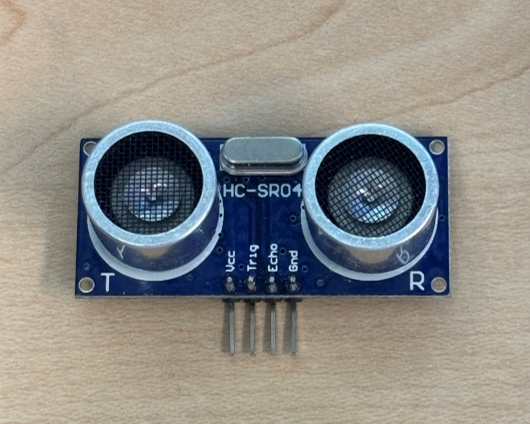
Ultrasonic Sensors are a common form of proximity and distance sensors used in a wide variety of different projects. These sensors feature both an emitter (trigger) which releases an ultrasonic sound wave, and a receiver (echo) which reads the ultrasonic sound wave as it returns.
Claire suggested edits:
In the Overview, provide the range and accuracy of these sensors. I'd get rid of the first sentence. Second sentence is great because it explains the working principle.
I actually had something written up about these sensors elsewhere, and I will paste my sentences here. Feel free to take 'em or leave 'em:
These sensors can detect objects within a range of 2 cm - 4 m with a ranging accuracy of up to 3mm. One thing to note is that they have a measure angle of 15 degrees, so they do well at measuring objects directly in front of the sensor. For most applications, this is favorable.

Helpful resource from Sparkfun with example code, and wiring diagram: https://www.sparkfun.com/ultrasonic-distance-sensor-hc-sr04.html
Students are welcome to come by and check out sensors from the Electronics Center. These are the sensors you can check out from the ITLL: link to inventory . If you do not see a sensor listed feel free to come in and chat with an Engineer about you project.
What is an Ultrasonic Sensor?
A PIR sensor comes with a small white dome shaped lens on top of the PCB. This lens, the Fresnel lens, helps focus light from any direction to the small pyroelectric sensor underneath. When motion occurs, half of this sensor detects a change in IR before the other, and the difference causes a signal change (from LOW to HIGH). These sensors also include a sensitivity and time delay adjustment potentiometer. Which allow you to change the range or distance the sensor can detect, and how long the sensor remains active (before switching back from HIGH to LOW). Below you can find an image labeling the potentiometers.
Wiring the Sensor
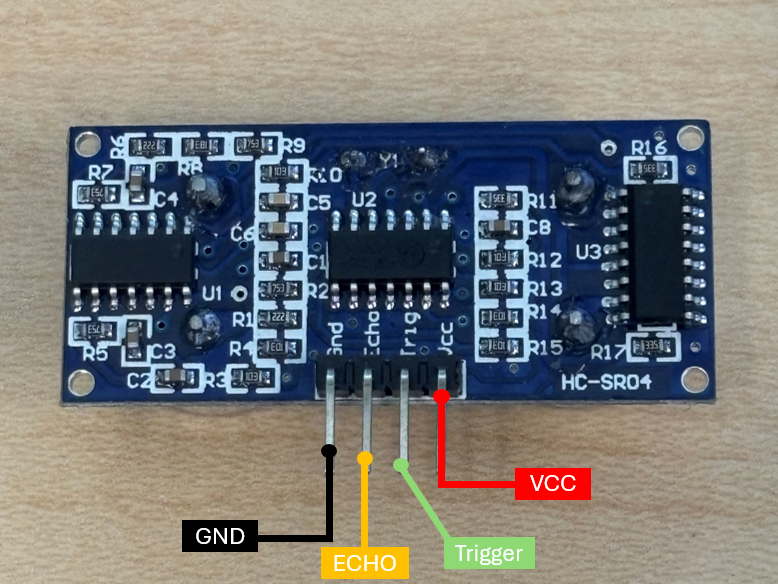
Important: Look up your specific sensors pinout and input voltage as they can differ. The pinout for the sensor we used in this demo was...
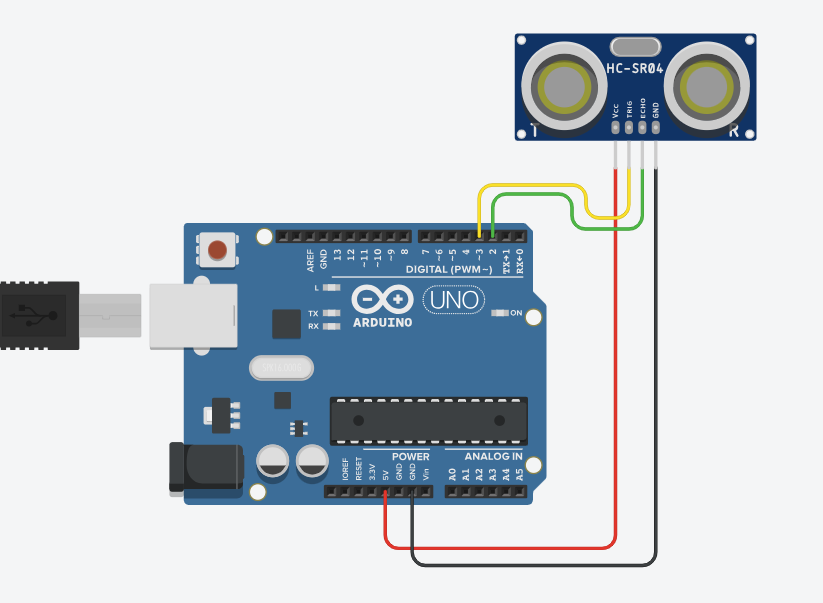
Example circuit setup:
- Ultrasonic sensor output (trig) connected to pin 3, input (echo) connected to pin 2, VCC connected to 5V, and GND (ground) connected to GND.
- The code uploaded to the Arduino (below) sets the trigger pin HIGH, emitting a wave, that then returns and is received by the echo pin. Using an equation that utilizes the speed of light we are able to determine the time it takes for the wave to return after being transmitted, giving us our distance.
Troubleshooting
Claire edits:
- If sensor reading 0 only
- Run test code below
- Ensure pin definitions are correct and wires are plugged in to correct spots - If nothing shows up in serial monitor
- Make sure you include Serial.begin(9600);
- Ensure serial monitor has 9600 baud rate selected
Simple Code
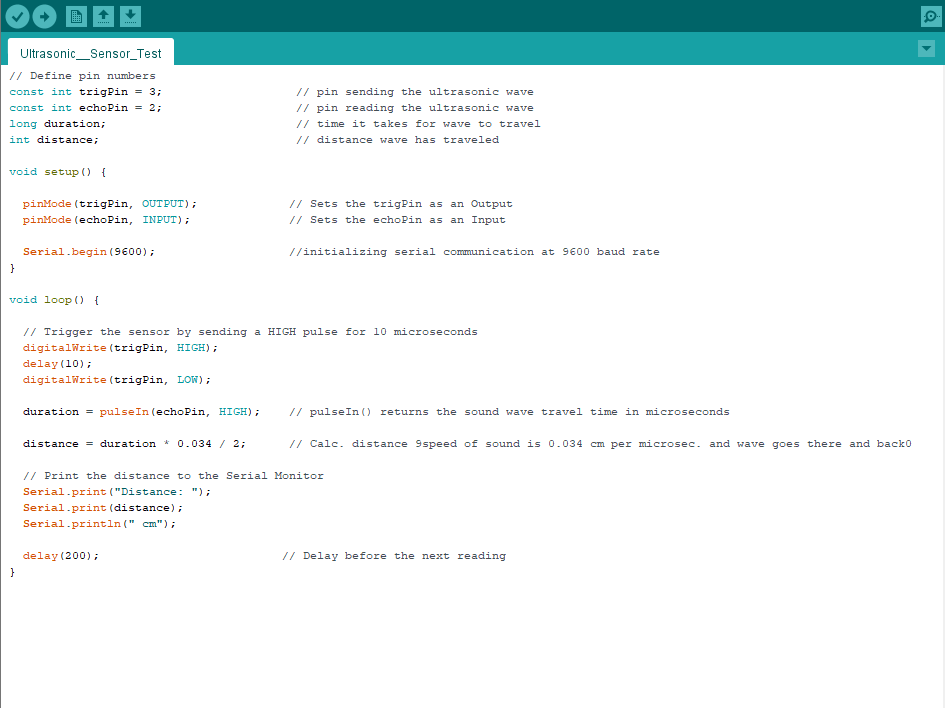
// Define pin numbers
const int trigPin = 3;                   // pin sending the ultrasonic wave
const int echoPin = 2;                   // pin reading the ultrasonic wave
long duration;                           // time it takes for wave to travel
int distance;                            // distance wave has traveled

void setup() {

  pinMode(trigPin, OUTPUT);             // Sets the trigPin as an Output
  pinMode(echoPin, INPUT);              // Sets the echoPin as an Input

  Serial.begin(9600);                   //initializing serial communication at 9600 baud rate
}

void loop() {

  // Trigger the sensor by sending a HIGH pulse for 10 microseconds
  digitalWrite(trigPin, HIGH);
  delay(10);
  digitalWrite(trigPin, LOW);

  duration = pulseIn(echoPin, HIGH);    // pulseIn() returns the sound wave travel time in microseconds

  distance = duration * 0.034 / 2;      // Calc. distance 9speed of sound is 0.034 cm per microsec. and wave goes there and back0

  // Print the distance to the Serial Monitor
  Serial.print("Distance: ");
  Serial.print(distance);
  Serial.println(" cm");

  delay(200);                          // Delay before the next reading
}