
Load cells (force sensors)
ITLL load cell inventory (note- this isn't updated with what is currently checked out)
So you want to measure force?
Load cells come in various form factors based on what type, magnitude, and direction of load you are interested in quantifying.
Ask yourself these questions when choosing a load cell (if you do, when you go to Electronics Center to check out a load cell from the DAQ engineer they will be very happy if you have already considered the following):
Am I measuring a compression or tension force?
Am I measuring a static or dynamic force?
Is one axis of measurement sufficient, or do I need a multi-axis load cell?
What is the maximum force I expect to measure?
Need help answering the questions above?
Compression vs tension
Compression load cells are perhaps more common; they measure a force that is pushed down into the load cell. Think of a bathroom scale.
Tension load cells measure a force that is pulled away from the body of a load cell. Think of a hanging scale for measuring the weight of luggage or a fish.
Static vs dynamic
An unchanging or very slowly changing force is a static force. Once again, the bathroom scale is a good example. A dynamic force is a transient or quickly changing load, such as a force from an impact or a vibration. Typically we use different load cells for static vs dynamic force measurements, and this is because the operational principle underlying each type of load cell differs. Static load cells comprise of strain gauges, which do not have a particularly fast response time, but they give a stable linear signal over time, whereas dynamic load cells often comprise of piezo-resistive elements which are capable of fast responses but offer a tradeoff with linearity over time.
Uniaxial vs multi-axial
If you only need to measure compression or tension along one axis (once again, think of standing on a bathroom scale, the only acceleration we are concerned with here is due to gravity, so F=ma is only along one vector), a standard uniaxial load cell will do just fine. However, if you are interested in measuring forces along multiple axes in a structure or a robot, a multi-axial load cell might eliminate a complicated set-up involving mounting multiple load cells along different axes.
Range
Load cells come in a wide span of ranges, from less than 1lbf (pound force) to over 2,000 lbf! If you use too high of a load cell, all of your data will be compressed down to the lower end of the range of your sensor, and you aren't maximizing the resolution of your DAQ. A good rule of thumb is to choose a sensor whose range is around 10% higher than your maximum expected force.
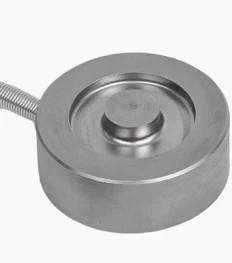
Often we use "pancake style" or "button" load cells to measure a uniaxial compression force.
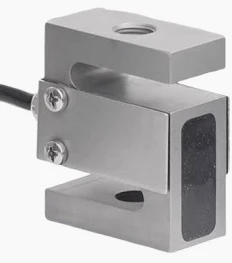
S-type load cells look like this:
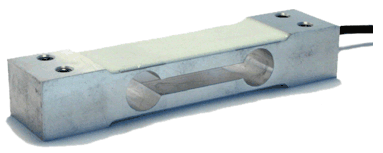
Single-point (you measure force at the center of the "dumbbell") load cells look like this:
Tension (and some dual tension/compression) load cells look like this:

...and there are many more kinds of load cells out there!
While they have difference appearances, they all rely on the same technology - they contain four strain gauges attached within the load cell. When a load is applied, the internal strain gauges stretch or compress, which changes their resistance value and leads to a change in voltage across the circuit. This change in voltage is proportional to the amount of force applied. We measure this voltage using a DAQ, and apply mathematical equations to convert this voltage to what we are really interested in - force in lbs or Newtons!
Enter the Wheatstone Bridge Circuit
All of the load cells pictured above contain four strain gauges internal to the load cell. The working principle is that the resistance values of the strain gauges change in response to an applied force. A change in resistance value is something we can measure electrically, and this electrical response is directly proportional to the applied mechanical force.
The circuit inside a load cell looks like this:

Each of the resistors depicted above is a strain gauge; you do not need to build the circuit, the resistors (strain gauges) are already in your load cell! You just need to apply an excitation voltage (VEX) and measure the voltage difference between the two parallel voltage divider circuits (VCH -/+ in circuit diagram above).
A little more detail, for curious minds
I include the information below so you understand how a load cell converts a physical force to voltage (which we can measure with a data acquisition (DAQ) device).
(Source: Pulled straight from NI-MAX by Claire)
Bridge-based sensors operate by correlating a physical phenomena, such as strain, temperature, or force, to a change in resistance in one or more legs of a Wheatstone bridge. The general Wheatstone bridge, shown in the following figure, is a network of four resistive legs with an excitation voltage, VEX, that is applied across the bridge. One or more of these legs can be active sensing elements.
A physical phenomena, such as a temperature shift or a change in strain applied to a specimen, changes the resistance of the sensing elements in the Wheatstone bridge. You can use the Wheatstone bridge configuration to help measure the small variations in resistance that the sensing elements produce corresponding to a physical change in the specimen. [Claire note - when the bridge is "balanced". it reads zero voltage when no load is applied]
[Claire note: the circuit depicted above is a full bridge circuit, where all four resistors (R1-R4) are strain gauges. If only two resistors are strain gauges, that would be a half bridge, and in a quarter bridge configuration only one of the resistors is a strain gauge. In a full or quarter bridge configuration, the remaining resistors are static resistors. Why would we ever do this? Sometimes a load cell isn't practical for our measurement, and we are more interested in analyzing strain along the skin of an aircraft, for example]
Cool, so how do I measure the voltage and translate it to what I'm really after - force?
To measure force data from your load cell, you will need to:
- Apply an excitation voltage across the red and black wires of your load cell
- Where you plug in the red and black wires depends on what data acquisition device you are using (Arduino, USB DAQ, NI 9219, NI 9237, etc)
- This will apply the excitation voltage to VEX+ and VEX - of the Wheatstone bridge circuit above
- These wires are often red and black on the load cell, respectively, but check your data sheet to be sure)
- Measure the voltage difference between the other two wires emanating from your load cell
- Where you plug in the yellow and white (or other color, depends on your load cell) wires depends on what data acquisition device you are using (Arduino, USB DAQ, NI 9219, NI 9237, etc)
- Check your datasheet to see which is VCH (+/-) in the circuit above
- Often the measurement wires are yellow and white, or green and white, where white is V-, but yours might be different. As always, check your datasheet for ground truth.
I will explain 1) how to use a USB DAQ e.g., NI 6008, 2) how to use an NI 9237 to read force data, and 3) how to use an Arduino to read the data.
1. Measuring using a USB DAQ (NI 6008, 6009, or new 6001/2)
This is the easiest way to go.
Step 1: Find the datasheet for your load cell
Step 2: Identify the range of excitation voltages that your load cell accommodates.
Step 3: Verify that 5VDC is within that acceptable range you found in Step 2.
Step 4: Wire the two EX+/EX- (might be labeled as something else on the load cell data sheet, but the leads that correspond to the excitation voltage) leads to the 5V and GND on your USB DAQ.
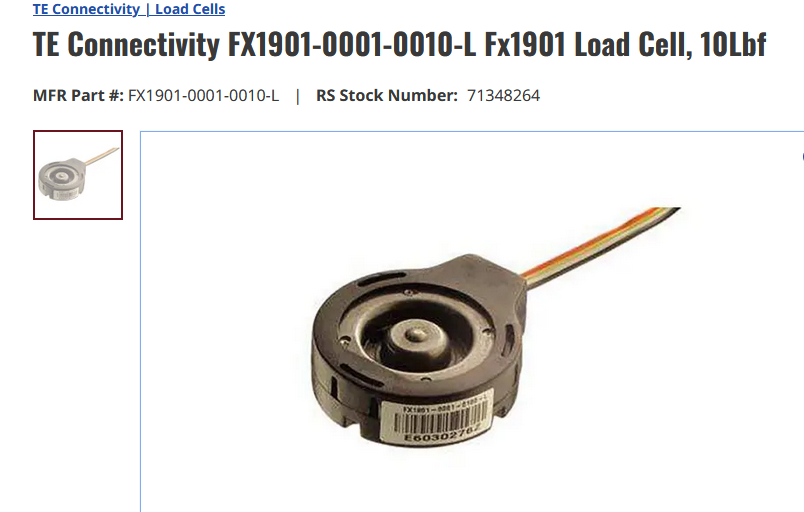
If you're using a FX1901-0001-0010-L , you can follow the color schematic below (V is excitation voltage and O is output voltage):
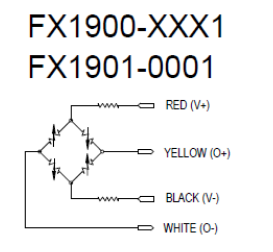
Step 5: Wire the V+/V- leads to analog inputs on your DAQ. For example, you might wire V+ to A0+ and V- to A0-. These wires are where you actually measure the changing voltage generated in response to your applied load; see wires labeled "CH-" and "CH+" in the NI graphic above if you are confused.
Step 6: Launch LabVIEW or NI MAX and click through to "Acquire Signals"; you are simply measuring a voltage from A0 (or whatever channel you chose). This is a differential, not an RSE measurement.
Step 7: To understand your data, you need to perform this calculation:
V_EX * span [mV/V] = max voltage (voltage corresponding to max rated load of your load cell)
So for our cute little 10lbf load cells, the span is 20 mV/V and I applied a 5VDC excitation voltage (V_EX). Therefore, my max voltage should be 0.1 volt, or 5V * 20mV/V = 100 mV. If I know the voltage at zero load, I can construct a linear relationship y = m*x + b where b is my zero offset and m relates force to voltage measured. I will add units for clarity: y [lbs] = m [lbs/mV] * x [mV] + b [lbs]. You'd want to solve for b by recording the voltage at zero load, and multiplying by the appropriate span to convert from mV to lbs.
2. Measuring using an NI-9237 DAQ to read force data
You will need:
- load cell
- NI breakout (RJ-50 [looks like an ethernet but has 10, not 8 pins] to screw terminal)
- RJ-50 cable (see note above about resemblance to ethernet cable)
- NI-9237
- NI cDAQ-9171
- Computer with LabVIEW/NI MAX
- USB A- USB B cable to interface with cDAQ
Photos of setup


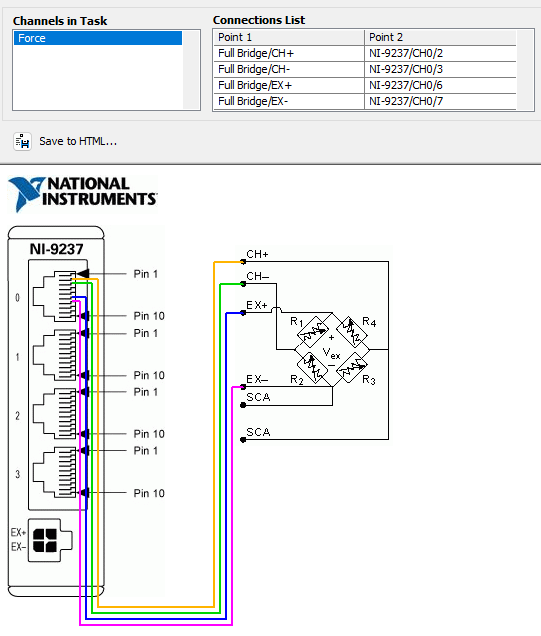
This is the connection diagram:
3. Using an Arduino to measure force data
in progress
- notes: make a point about how small the voltage is, and the ADC of the arduino limits our resolution
- to solve this problem, we need to amplify the output voltage from the load cell
- how to do this using a load cell amp, or build your own circuit
- or choose a load cell that gives amplified output