
FAQ - Prusa MK4s/Self Service Printers
How do I reduce print time?
The three ways you can reduce print time is by changing the scale/size, infill, or print quality of your part.
To reduce the size of your part, you can go to the "Layout" button on the original uploaded .stl file, then go to the "scale" tab. (Make sure you are clicked onto the part, otherwise, the move, rotate, and scale buttons will be grayed out.) Make sure the "keep proportions" toggle on the right is enabled, and then you can either click and drag your mouse or input measurements or scaling percentages to reduce the size of the part. 
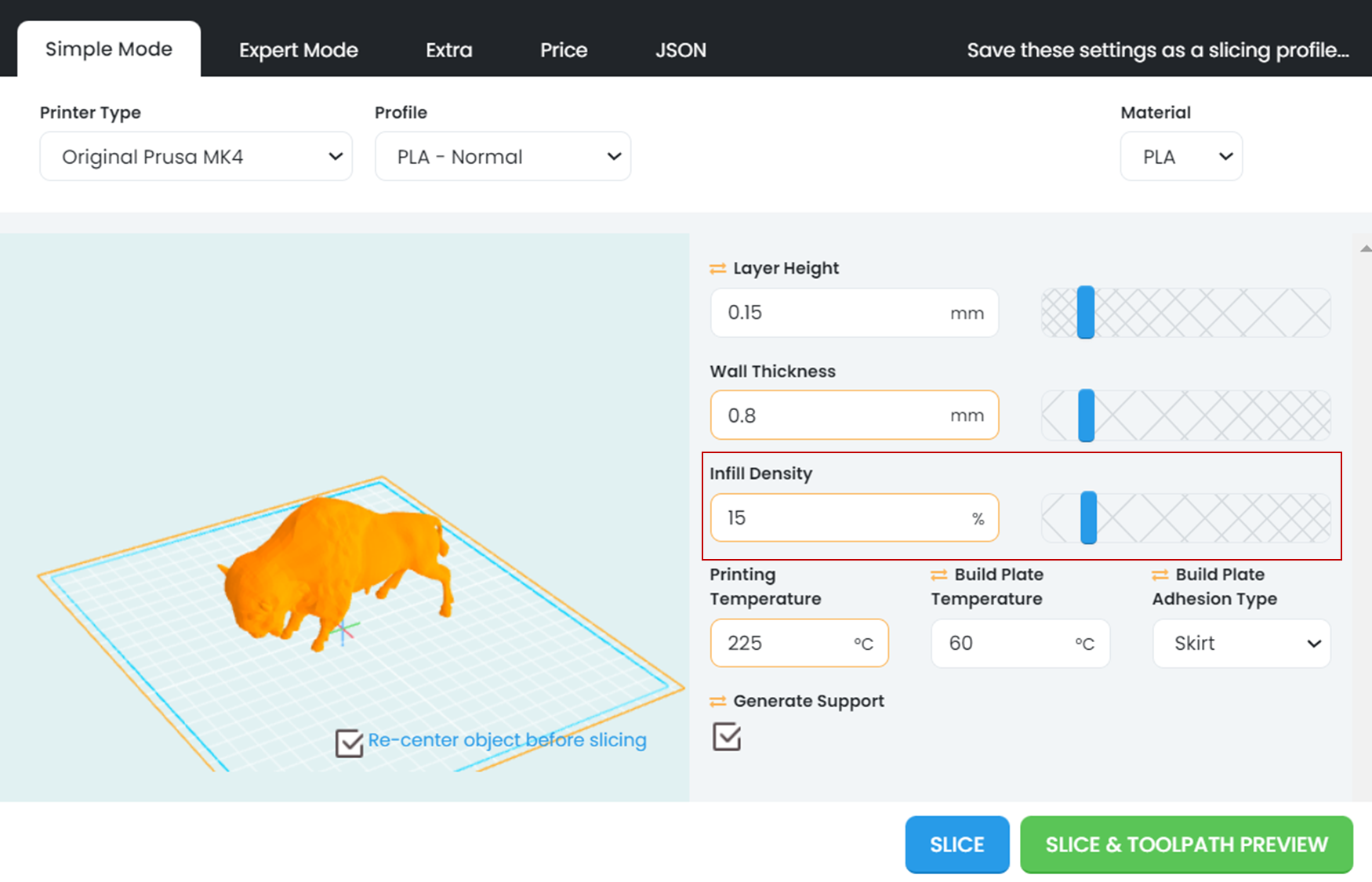
To change infill, you will need to hit the "Slice" button on your part to pull up the slicing settings menu. Depending on the part, infill should never be below 5-15%.
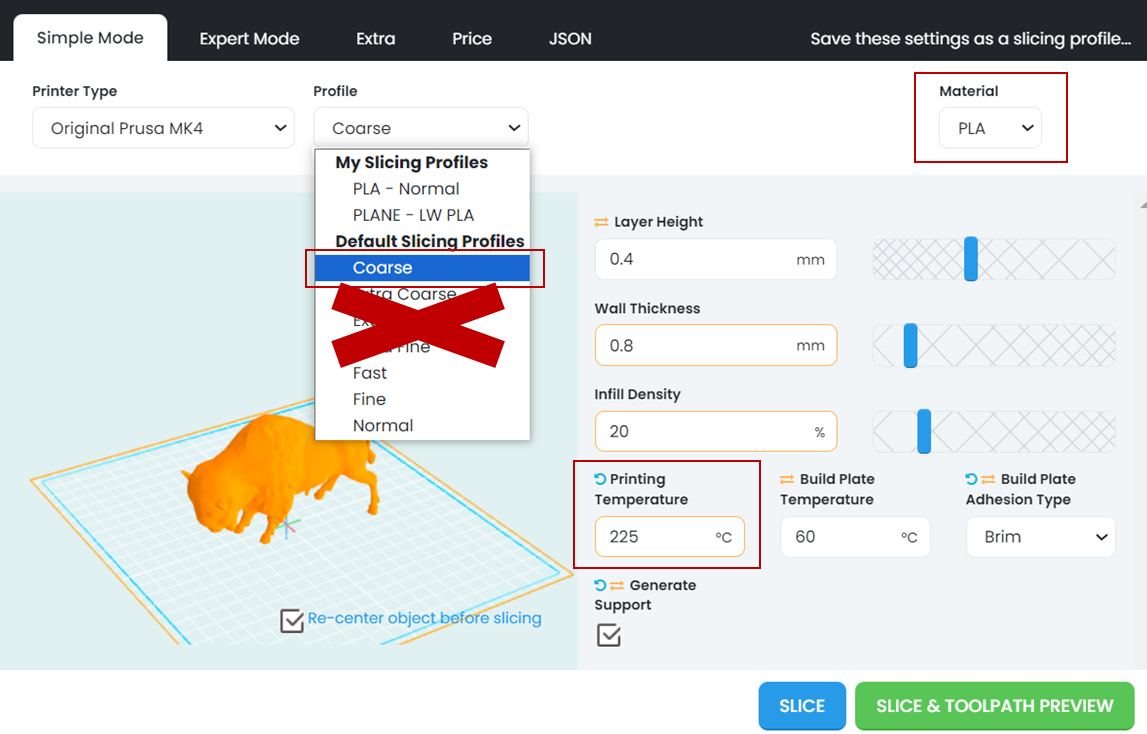
You can also change the printing profile to "Course", which will dramatically decrease print time. To to do this, go to the slicing settings on your part, click the drop down menu underneath "Profile" and select "Course". NOTE: DO NO select the Extra Course, Extra Fast, or Extra Fine printer profiles, those settings exceed the limits of our printers and will cause your part to fail. (To learn more about why those profiles don't work well with our printers, go to the Layer Heights page on the 3DPOS Slicer Settings page.) Link to that page
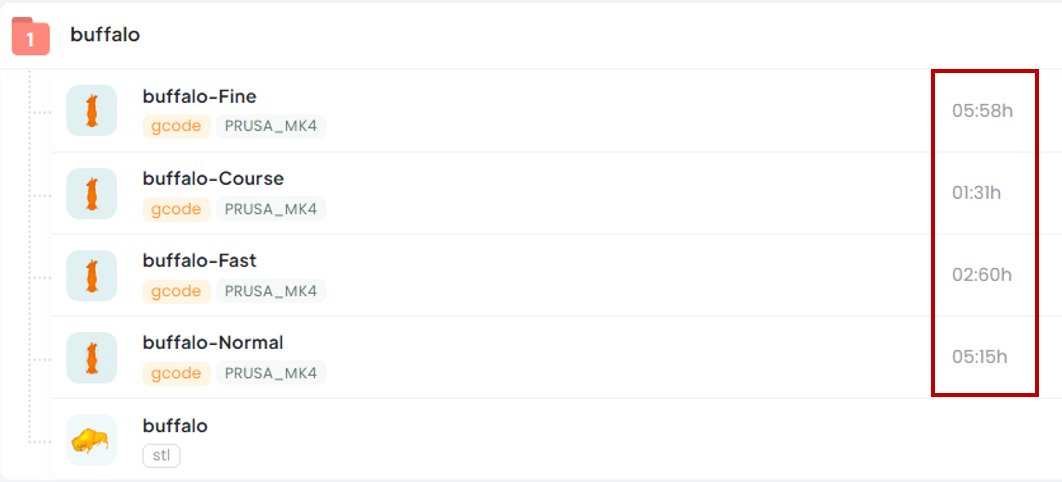
The image below shows how the different profiles can impact your print time. "Course" for example, a profile with the largest layer height, reduces the print time to a quarter of the time it would take using the "Normal" profile.
My first layer isn't sticking, how do I fix it?
What printers can I use at the ITLP?
Once you take a workshop, you can use any of our self service Prusa MK4 3D printers anytime our building is open. See here for building hours and access to extended hours
You can also use our fabrication request system to order a part using one of our two high definition printers. Make sure to submit an STL file that has been exported in mm. Also be sure to check the print bed size of the Markforged or Objet printer to make sure that your part is the right size for one of these printers.
Are there other places I can 3D print?
Each campus makerspace has their own policies and procedure. Be sure to contact them to see if and how you can gain access to their spaces. Here are some nearby:
Some free off-campus resources include:
Paid Makerspace Access:
SolidState Depot (student discounts available)
Paid 3D Printing Services:
ExBuild (for higher definition printing)
When I upload my file to 3DPOS, I can't view the layout or it fails and shows a black square in the part icon. How do I fix it?
First, try reloading the page. Next, most commonly, this is because of a corrupted file. Make sure any parts that were downloaded were extracted successfully from a compressed or zipped folder. If a compressed folder or .stl file is uploaded to 3DPOS, it won't upload properly and will continually crash. If you don't know how to unzip a folder, you can use this link to learn more.
If the file is not .stl or .gcode you will also get errors.
How do I submit a print request to the HD3DP system?
You can submit a print request on our website here. Please note that we only accept .stl files. You can indicate printer type and approximate size on the submission form.
I'm having issues logging into 3DPOS, who do I talk to?
If you have taken the workshop, you can talk to our ITLP engineer Dr. Kat Penzkover
If you have not taken the 3D printing workshop, you will need to take it it to get access to the printers and 3DPOS system.
I have questions about 3D printing and/or designing for 3D printing, who do I talk to?
Talk to Dr. Kat Penzkover, our ITLP engineer that leads our 3DP ecosystem.
How do I print with TPU?
We have one printer dedicated to printing with TPU (10A). If you are going to use this printer for your part, please slice your part using the TPU slicer settings. This may look very similar to our PLA settings but there are some expert settings that we have altered to get the best print with TPU. So, use the TPU settings and a satin bed (not smooth) when printing on the TPU printer.
How do I print with PETG?
Talk with an ITLP Engineer or ESS to use this material.
I’ve already taken the 3D printing workshop with the old Lulzbot printers. (i.e. before AY23/24). Do I need to take it again?
| Question | Answer | Supporting Documents/Pictures |
| How to I gain access to the Prusa 3D printers in the ITLL? | To use the printers, take a 3D printing workshop. |
Use this link to sign up for workshops: https://itll.colorado.edu/ |
| I've taken the workshop and still see 'No Printers Available' | You will need a clean log-in after taking the workshop to be able to see the printers. Try logging-out and logging back in. If that doesn't work, please see the 3DP engineer. | |
| Can I use my own Filament? | No, filament is pre-loaded onto the ITLL printers. | |
| There is not enough filament to complete my project, can you change the roll? | No, these printers are equipped with filament sensors which will automatically alert the ITLL staff that the filament needs to be replaced and will pause the print and re-start where it left off after new filament is installed. | |
| How do I export files from OnShape or Solidworks for 3D printing? | Be sure to export your file as an .stl and make sure that the units are millimeters. | |
| Can I reserve a printer? |
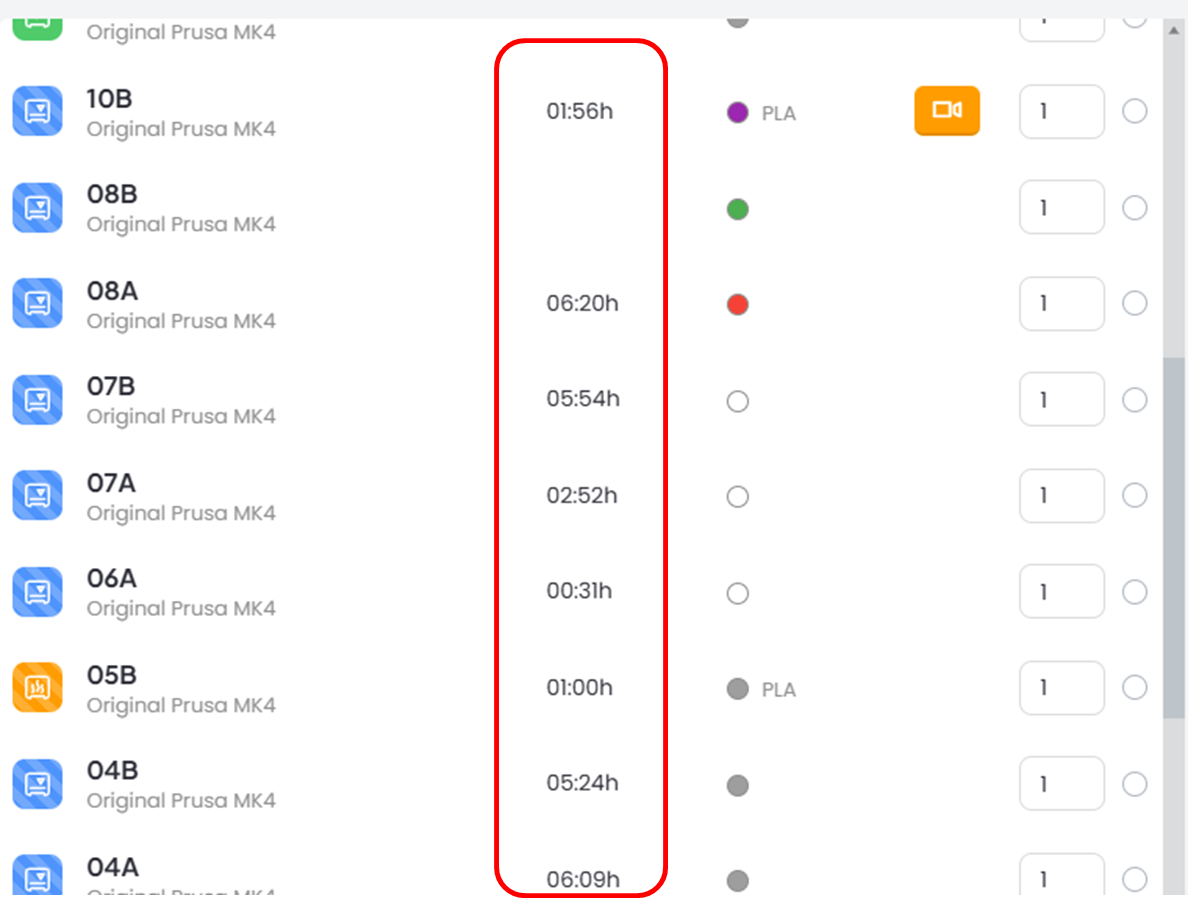
Our printers are strictly first-come, first-served. You can see when printers are going to come available by checking the 'time' column when you press print.
Hot Tip: there is always a printer available at 8am. |
 |